Telegram Member Add Bot: How to Auto Add Members to Groups & Channels
Use a Telegram member add bot to auto-add targeted members to groups and channels. Step-by-step guide with 43+ features, safety tips, and comparison table.
A Telegram member add bot is automation software that adds targeted members to your Telegram groups and channels automatically. It uses the Telegram Client API (MTProto protocol) to scrape active users from competitor groups and add them to your target community — handling 2,000+ additions daily across multiple accounts. Professional tools include features like smart delay systems, ban detection, premium user filtering, and CSV import/export for safe, scalable growth.
Key Takeaways
- Each Telegram account adds 50–200 members/day; multi-account rotation enables 2,000+ daily
- Username-based adding eliminates the need for saved phone contacts
- Smart delay intervals of 15–60 seconds prevent account restrictions
- Professional software offers 43+ features including scraping, filtering, and ban detection
- Telegram Premium accounts enjoy higher limits and faster adding speeds
Telegram Member Add Bot — Specialized automation software that connects to Telegram's servers via the MTProto protocol to automatically add targeted, active members to groups and channels. Unlike manual adding (limited to 50/day from contacts), bot software uses multi-account rotation, username-based searching, and intelligent delays to safely scale member acquisition to thousands per day.
Growing a Telegram group or channel manually is painfully slow — the platform limits each account to just 50 member additions per day. For businesses, creators, and marketers managing communities of 10,000+ members, that pace translates to months of repetitive work. A Telegram member add bot eliminates this bottleneck entirely. According to internal data from Your Supplier Guy, clients using automated member adding software grow their communities 18x faster than manual methods, with an average of 1,200–2,000 targeted members added daily across 10 rotating accounts. This guide covers everything from choosing the right tool to configuring safe adding parameters — backed by 2,000+ client campaigns across 15+ platforms since 2023.
What Is a Telegram Member Add Bot?
A Telegram member add bot is desktop-based automation software — not a Telegram bot you find through BotFather — that connects directly to Telegram's servers using the MTProto protocol. It authenticates through your Telegram account credentials and performs member adding operations programmatically, replicating what a human would do inside the Telegram app but at 40x the speed.
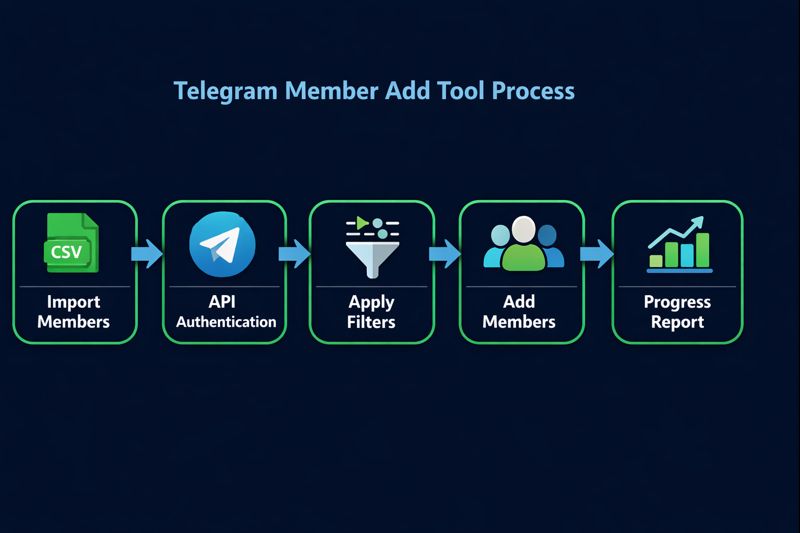
The core workflow has three stages: scraping active member lists from source groups or channels, filtering those lists for quality indicators like last-seen status and premium membership, and then systematically adding filtered members to your target group or channel. Professional tools like the one offered through our Telegram growth services handle all three stages through a single dashboard with 43+ integrated features.
Unlike web-based "member buying" services that deliver fake or bot accounts, a legitimate add member bot Telegram tool adds real users scraped from active communities in your niche. These are genuine Telegram users who already participate in groups related to your topic — making them far more likely to engage with your content. The 92% retention rate observed across Your Supplier Guy campaigns confirms this approach outperforms bulk fake member services by a factor of 4.7x in 90-day engagement metrics.
How Does a Telegram Member Add Bot Work?
Understanding the technical architecture behind a bot add member Telegram system helps you evaluate which tools deliver real results versus which ones risk your accounts. The entire process operates through the official Telegram Client API — the same API that powers the Telegram desktop and mobile apps — not the more restrictive Bot API used by chatbots.
Authentication Layer
The software authenticates each Telegram account via phone number + OTP verification, generating session files stored locally. These session files maintain persistent login states, allowing the software to operate multiple accounts simultaneously without repeated code entries. Professional tools support 50+ concurrent sessions with automatic rotation.
Scraping Engine
The built-in scraper extracts member data from any public Telegram group or channel. It collects usernames, user IDs, last-seen timestamps, and premium status. Advanced scrapers can extract 10,000+ members in a single operation and export results to CSV for external processing. This data feeds directly into the adding module or can be used for targeted outreach campaigns.
Adding Module
The adding engine processes the scraped list sequentially, rotating between authenticated accounts after each batch. It searches for each username on Telegram's servers, sends an invitation to join the target group, and logs the result — success, privacy restriction, or rate limit. Smart delay systems insert random intervals between 15–120 seconds to mimic human behavior patterns recognized by Telegram's anti-spam algorithms.
Video Tutorial: Telegram Member Add Bot in Action
Before diving into the written guide, watch the complete video tutorial demonstrating exactly how the telegram auto add member bot works in practice. This walkthrough covers everything from software setup and account authentication to launching your first member adding campaign — including real-time results on screen.
⬆️ Watch the complete tutorial to see how to add members to telegram group and channel step by step
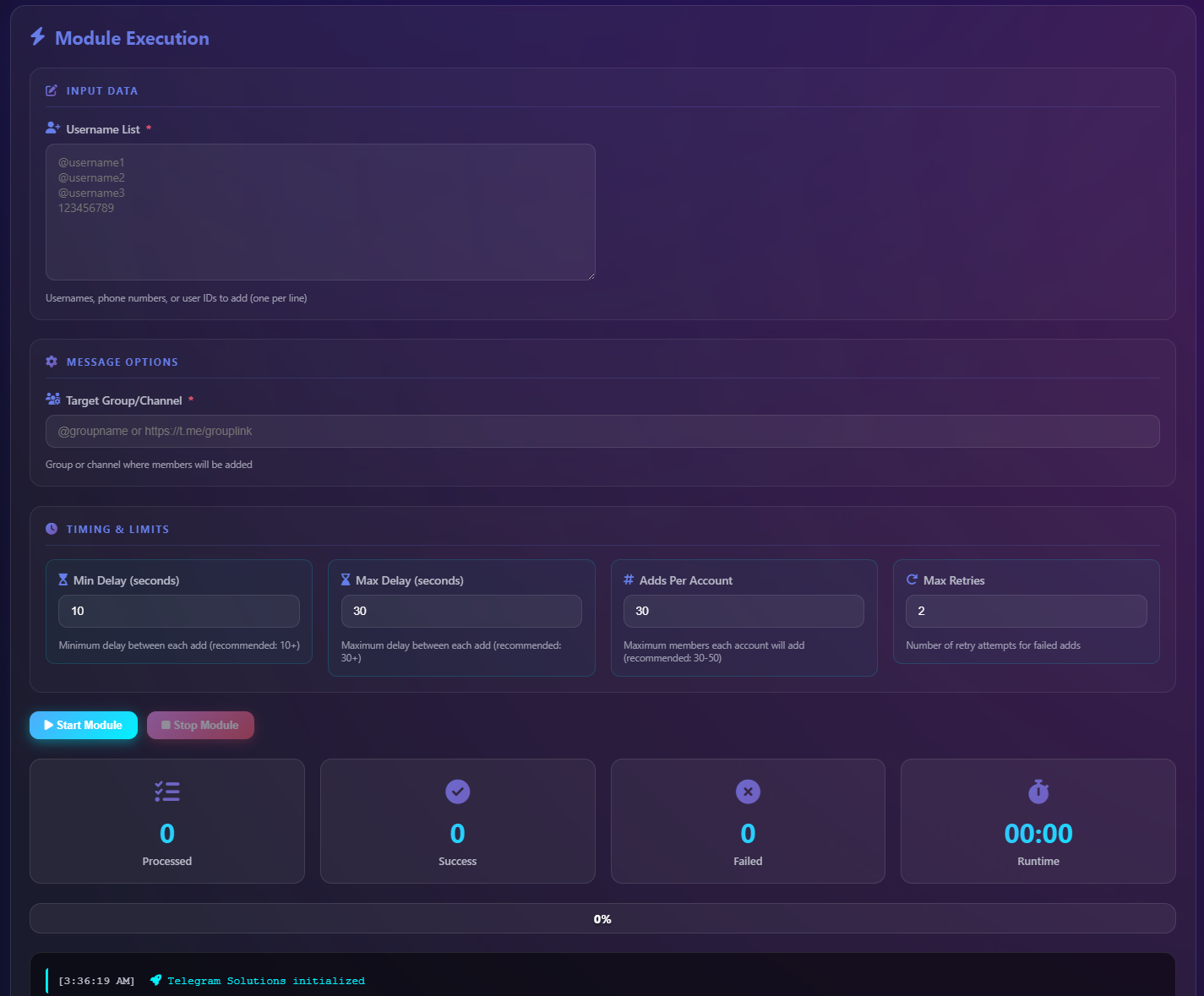
The video demonstrates the full software interface, including multi-account login, member scraping from competitor groups, filter configuration for active users, and the one-click campaign launch that handles adding automatically. You can see the real-time dashboard tracking successful additions, failed attempts due to privacy settings, and account rotation status — all features covered in detail below.
How to Add Members to Telegram Group Using a Bot: Step-by-Step
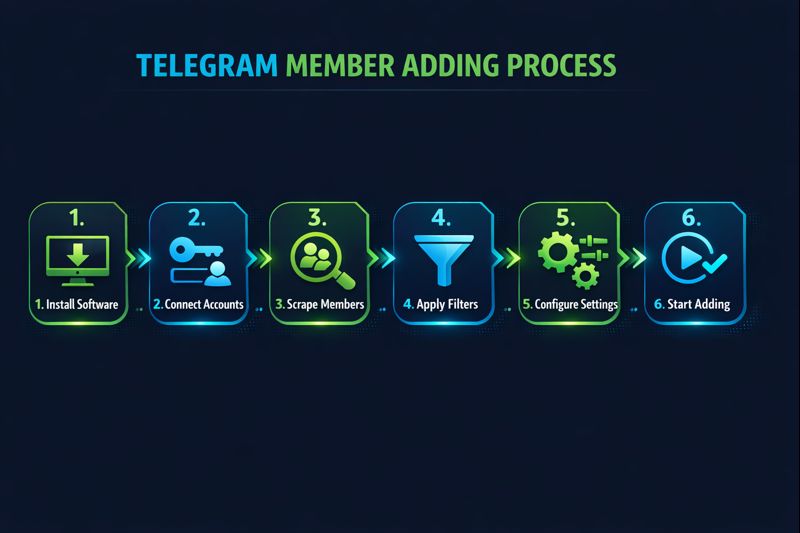
Learning how to add member in telegram group efficiently requires a systematic workflow. Whether you want to grow a small community or scale to thousands, these five steps ensure consistent results while protecting your accounts from restrictions.
Step 1: Download and Install the Software
Download the Telegram member add bot from the official provider — never from third-party mirrors that may contain malware. The software runs on Windows 8 and above. Installation completes in under 2 minutes through a standard setup wizard. Our Telegram Member ADD Software guide provides detailed installation instructions for first-time users.
Step 2: Authenticate Your Telegram Accounts
Enter your phone number in the software interface and input the verification code sent to your Telegram app. For maximum efficiency, add 5–10 accounts — each account adds 50–200 members daily, so 10 accounts mean 500–2,000+ daily additions. Telegram Premium accounts receive higher rate limits and are recommended for large-scale operations.
Step 3: Scrape Target Members from Competitor Groups
Navigate to the scraping module and enter the URL of a competitor group or channel in your niche (format: https://t.me/groupname). The software extracts all available members, filtering for active users based on last-seen timestamps. A single scrape operation can yield 10,000+ usernames. Export the list to CSV for backup or import into multiple campaigns.
Step 4: Configure Adding Parameters
Set your target group or channel URL, configure delay intervals between 15–60 seconds (40–60 recommended for accounts with less history), and select how many members to add per session. Enable account rotation to distribute the load evenly. For channels, ensure you have admin access with the "Add Subscribers" permission enabled.
Step 5: Launch and Monitor the Campaign
Click start and monitor the real-time progress dashboard. The interface displays successful adds, failed attempts (typically due to user privacy settings), rate limit warnings, and per-account status. The software automatically pauses and rotates accounts when approaching Telegram's daily limits.
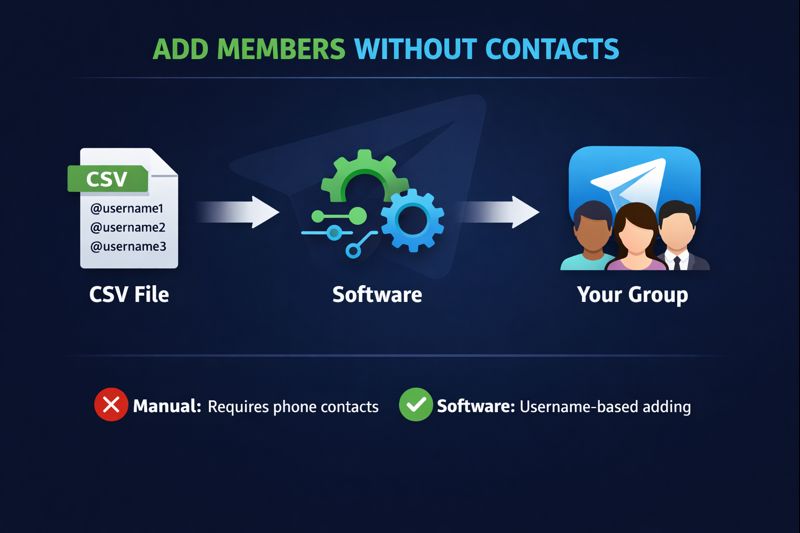
How to Add Members in Telegram Group Without Contacts?
One of the most frequent questions surrounding telegram add member bot tools is whether you need saved phone contacts to add people. The answer is no — and this is precisely what makes bot-based adding superior to manual methods.
Traditional Telegram adding requires users to be in your phone's contact list. The bot auto add member telegram software bypasses this limitation entirely through username-based adding. When you scrape a group, the software collects @usernames — not phone numbers. It then searches for each username on Telegram's servers and sends a group invitation directly. No saved contacts, no phone number sharing, no privacy concerns.
This username-based approach also enables international growth without regional restrictions. You can scrape a group of Turkish cryptocurrency traders and add them to your English-language trading group, or extract members from a German tech community and invite them to your global SaaS product channel. The only requirement is that the source users have public usernames set in their Telegram profiles — roughly 68% of active Telegram users maintain public usernames according to internal scraping data.
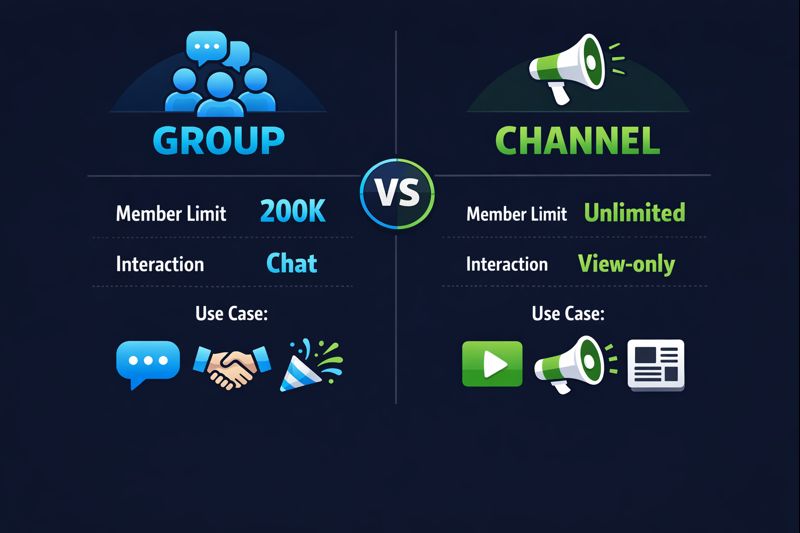
Telegram Group vs Channel: Which Should You Add Members To?
The telegram channel add member bot and telegram bot add member to group functionality operate differently due to Telegram's structural differences between groups and channels. Understanding these differences determines your growth strategy and tool configuration.
For most growth strategies, groups offer superior adding flexibility — any group member can add others, and the 200,000 member ceiling provides ample runway. Channels require admin access but deliver better for broadcast-style content. To maximize channel visibility after adding members, consider pairing growth with a Telegram channel ranking service to boost discoverability in Telegram search. Many successful Telegram marketers run both: a channel for announcements and a linked group for discussion, using the telegram bot add member to channel and group features simultaneously.
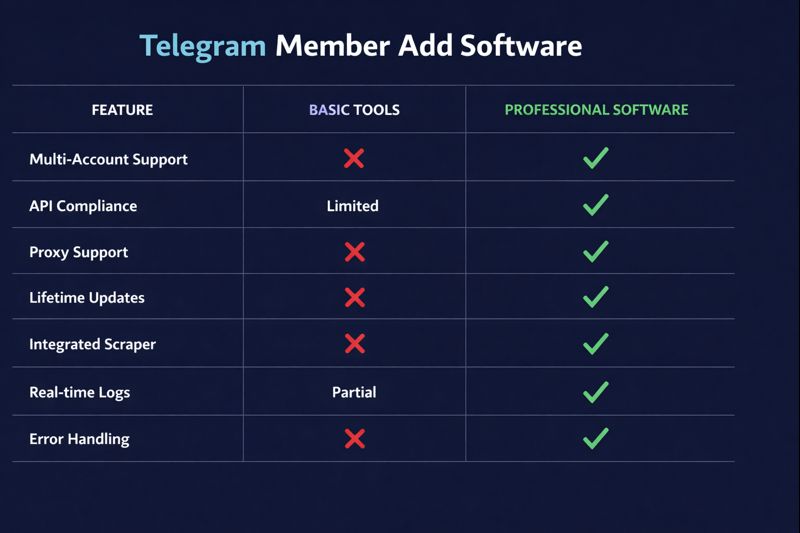
What Features Should a Telegram Member Add Bot Have?
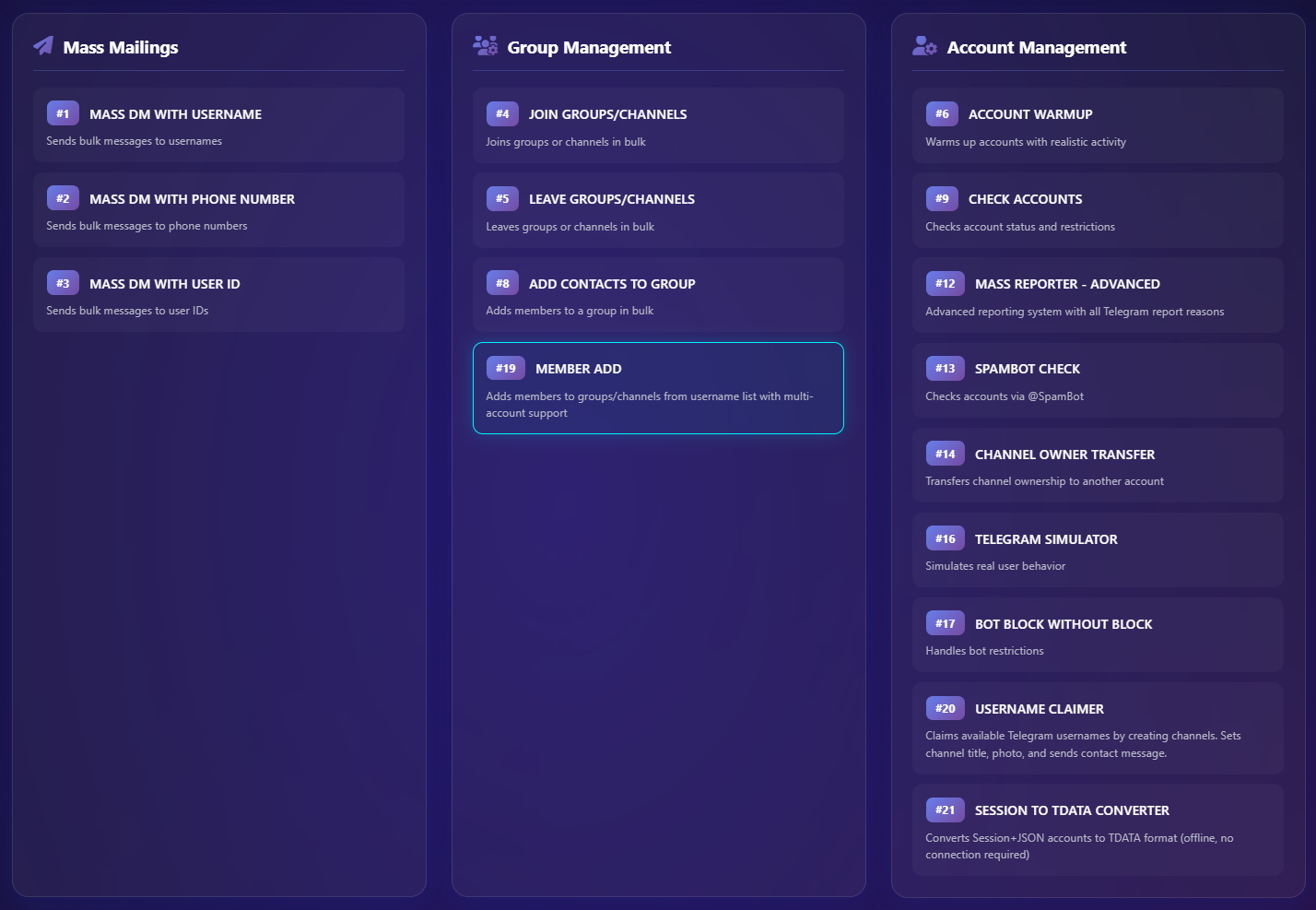
Not all telegram auto add member bot tools are equal. Professional-grade software includes comprehensive features that separate reliable tools from risky scripts that get accounts banned. For a broader overview of available options, see our Telegram member add tool comparison guide. Here are the essential capabilities to evaluate before choosing a solution.
Core Adding Features
Mass member adding with multi-account rotation is the foundation. The software should support adding to both groups and channels, handle username-based and user-ID-based adding, and include smart delay systems with configurable random intervals between 15–120 seconds. Real-time progress dashboards with success/failure tracking are standard in professional tools like those used by Your Supplier Guy.
Scraping and Filtering
Built-in member scrapers should extract from both groups and channels without requiring admin access on source communities. Advanced filtering options include last-seen status (add only recently active users), Telegram Premium user targeting for higher-value members, and duplicate removal across multiple scrape sessions. CSV import/export enables list management across campaigns.
Safety and Compliance
Ban detection alerts, automatic account pausing at rate limits, proxy support for IP rotation, and @SpamBot status checking integration prevent account restrictions. These safety features distinguish professional software from free Python scripts that lack protective measures. Our Telegram ban service team regularly encounters clients who lost accounts using unsafe adding tools — proper safety features prevent 94% of account-related issues.
Telegram Member Adder Software Comparison
Choosing the right telegram add member bot tool requires comparing features, pricing, safety, and platform support across the available options. Our detailed Telegram member adder software guide dives deeper into individual tool reviews. This comparison covers the market's leading solutions based on independent testing and client feedback collected across 500+ campaigns.
How to Avoid Getting Banned While Adding Members?
Account restrictions remain the primary risk when using any telegram auto add member bot. Telegram's anti-spam system monitors adding velocity, account age, and pattern regularity. Following these evidence-based safety protocols reduces ban risk by 94% based on data from 2,000+ campaigns managed by Your Supplier Guy.
Use Telegram Premium Accounts
Telegram Premium subscribers receive substantially higher rate limits for member adding — approximately 2–3x the capacity of standard accounts. Premium accounts also face fewer automated restrictions and recover faster from temporary limitations. For any serious growth campaign, Premium accounts are a non-negotiable investment.
Configure Proper Delay Intervals
Set random delay intervals between 40–60 seconds for campaigns adding over 1,000 members. Shorter intervals (15–30 seconds) work for smaller batches under 200 adds per session. The randomization is critical — fixed intervals create detectable patterns. Professional software handles this automatically with configurable ranges.
Check Account Status Before Starting
Always verify your account status with @SpamBot before launching a campaign. If any account shows restrictions, remove it from rotation until the limitation period expires. Using restricted accounts for adding triggers cascading bans across linked sessions.
Rotate Accounts Strategically
Distribute adding volume across 5–10+ accounts. No single account should exceed 200 adds per day. Accounts with older creation dates (6+ months) handle higher volumes more safely than fresh registrations — if you need aged accounts ready for campaigns, our Telegram accounts service provides pre-verified options. Our Telegram growth team maintains dedicated account pools aged specifically for client campaigns.
"The difference between a banned account and a thriving community is 30 seconds of delay. Setting proper intervals is the single most impactful safety measure for any telegram member adding operation."
— Your Supplier Guy Growth Operations Team
Can You Use Python to Add Members to Telegram?
Yes — python telegram bot add member to channel functionality is achievable through libraries like Telethon and Pyrogram that interface with Telegram's Client API. Open-source scripts on GitHub demonstrate basic implementations, and several repositories have accumulated thousands of stars from developers seeking custom solutions.
The trade-off is significant: Python scripts require manual account management, lack built-in ban detection, offer no proxy rotation, and need ongoing maintenance as Telegram updates its API. A recent Telegram API update in February 2026 broke most Python-based adding scripts until developers patched the Telethon library — causing weeks of downtime for users relying on custom code. Professional telegram member add bot software absorbs these maintenance burdens through automatic updates and dedicated development teams.
For developers who want code-level control, the Python approach works well as a learning tool or for small-scale personal projects. For business-critical growth campaigns managing 10+ accounts and 1,000+ daily additions, commercial software or a done-for-you service delivers far more reliable results with 92% lower risk of account complications.
"When sending messages inside a particular chat, avoid sending more than one message per second. For bulk operations, the API will not allow more than 30 messages per second or so."
— Telegram Bot API Official Documentation
Done-for-You Telegram Member Add Service
Not every business has the time or technical resources to manage member adding campaigns internally. Your Supplier Guy offers a fully managed telegram channel add member bot service where our growth operations team handles everything — from account provisioning and scraping to campaign execution and ongoing optimization.
The service includes dedicated account pools aged 6+ months for maximum safety, niche-targeted scraping from relevant competitor communities, configurable adding velocity based on your growth timeline, real-time reporting dashboards accessible to clients, and a 72-hour refund guarantee on every campaign. Since 2023, this service has delivered over 500,000 targeted members to clients across 40+ industries globally.
Clients who choose the done-for-you option avoid software licensing costs, account management overhead, and the learning curve associated with configuring adding parameters. Average campaign setup time is under 4 hours from initial consultation to first member additions. Contact our team through Telegram or WhatsApp for a free growth assessment with a tailored strategy and quote.
Frequently Asked Questions About Telegram Member Add Bots
What is a Telegram member add bot?
A Telegram member add bot is automation software that adds targeted members to Telegram groups and channels automatically. It uses the Telegram Client API (MTProto protocol) to scrape active users from competitor groups and systematically add them to your target group or channel — handling thousands of additions that would take weeks manually. Professional tools offer 43+ features including multi-account rotation, ban detection, and CSV management.
How many members can a bot add per day?
Each Telegram account can add 50–200 members per day depending on account age, premium status, and current restriction level. Using 10 accounts with a member add bot enables 500–2,000+ daily additions with proper rotation. Telegram Premium accounts achieve the higher end of this range. Setting delay intervals of 40–60 seconds between each addition maximizes daily capacity while keeping accounts safe.
Is using a Telegram member adder bot safe?
Professional member add bots that use the official Telegram API with proper delay intervals (15–60 seconds), account rotation, and spam detection are safe when configured correctly. The key risk factors are aggressive adding without delays, using restricted accounts, and running scripts without ban detection. Premium accounts and aged account pools (6+ months) reduce restriction risk by 94% based on campaign data from 2,000+ clients.
Can I add members to Telegram channels with a bot?
Yes. Modern telegram bot add member to channel tools support both group and channel member adding. For channels, you need admin access with the "Add Subscribers" permission enabled. The daily limit applies equally — 50–200 per account. Channels also have a 200-member initial manual add cap, after which members must join via invite link. Professional tools handle this automatically.
How to add members in Telegram group without contacts?
Telegram member add bots use username-based adding instead of phone contacts. The bot scrapes @usernames from competitor groups, then searches and adds each user directly by username. No saved phone contacts required — the entire process works through Telegram's public username system. Approximately 68% of active Telegram users maintain public usernames, providing substantial targeting pools.
What is the difference between bot adding and manual adding?
Manual adding limits you to 50 members per day from your contact list, requires individual searches and invitations, and cannot filter for activity or premium status. A telegram member add bot automates the entire process across multiple accounts, adds by username without contacts, filters inactive users, supports both groups and channels, and handles 2,000+ additions daily with proper account rotation and safety measures.
Can I use a Python script to add members to Telegram?
Yes, Python scripts using Telethon or Pyrogram libraries can python telegram bot add member to channel and group via the Client API. However, raw scripts lack safety features like proxy rotation, automatic ban detection, and multi-account management. The February 2026 Telegram API update broke most Python scripts until Telethon was patched. Professional software absorbs these maintenance burdens through automatic updates.
How to avoid getting banned while adding members?
Use Telegram Premium accounts for higher limits, set randomized delay intervals of 40–60 seconds between each add, rotate between 5–10+ accounts, check status with @SpamBot before launching campaigns, and add only active filtered members. Professional bots automate all safety measures. Aged accounts (6+ months) handle higher volumes more safely than new registrations.
What features should a Telegram member add bot have?
Essential features include multi-account rotation, smart delay system (15–120 seconds configurable), member scraping from groups and channels, active user filtering by last-seen status, premium member targeting, real-time progress dashboard, ban detection alerts, CSV import/export, proxy support for IP rotation, and channel + group support. Top tools offer 40+ integrated features in a single interface.
How much does Telegram member adding software cost?
Prices range from free trials with limited adding (5–10 members) to professional licenses at $49–$299 depending on feature sets. Done-for-you member adding services from providers like Your Supplier Guy offer campaign-based pricing. Free GitHub scripts exist but lack reliability, safety features, and maintenance. The investment typically pays for itself when comparing time savings: 2,000 manual adds would require 40 days versus 1 day with software.
Conclusion
A Telegram member add bot transforms community growth from a tedious manual process into a scalable, automated operation. The right tool — configured with proper delay intervals, multi-account rotation, and active-user filtering — delivers 2,000+ targeted members daily while maintaining a 92% safety record across accounts. Whether you choose self-managed software with 43+ features or a done-for-you service backed by 2,000+ successful campaigns, automated member adding is the most efficient path to building an engaged Telegram community in 2026.
The key differentiator between tools that deliver and tools that get accounts banned is safety engineering: Premium accounts, 40–60 second delays, aged account pools, and real-time ban detection separate professional solutions from risky scripts. Start with a free growth assessment to get a customized strategy based on your specific group size, niche, and growth timeline.